Act as an elite full-stack developer and UI/UX expert. Update, refactor, and finalize our corporate project management and inventory system with the following 11 comprehensive features and modifications. Ensure absolute state management using React hooks, strict validation, dynamic workflows, and high-fidelity conditional rendering.

1. Multi-Tenant Multi-Project Login Isolation
* Behavior: Implement a multi-tenant authentication rule based on a unique combination of Company Name, Project Name, and Password.
* Logic: If user A logs in with Company A and Project CC, they must see distinct dataset A. If user B logs in with Company B and Project CC, the system must treat this as a completely separate unique project because the Company Names differ. Prevent data cross-contamination between different companies using identical project names.

2. Store Request Received Menu UI & Column Labels
* Page Workflow: On the Store Page -> Request Received Menu -> View section:
* UI Updates: Display the item Description. Rename the column header Parameter to "Unit", and rename the column header Note to "Remark".
* Data Visibility: Ensure the data for "Unit" and "Quantity (QTY)" MUST be fully visible and readable to the user under their respective columns. Do not hide these core transaction details.
* Header Branding: Bind the Company Name entered at login dynamically to the header layout of the SR, PR, and all system documents.

3. Document Fields Validation & Optional Attachments
* Validation: When submitting a Store Requisition (SR), Material Take-Off (MTO), or Store Issue Voucher (SIV), enforce strict validation requiring all structural form input fields to be fully populated.
* Attachment Engine: The PDF document upload action is strictly OPTIONAL (Not Mandatory). Users can successfully submit forms without an attachment.
* File Operations: If they choose to attach a file, provide a Click to View link for uploaded PDFs, a Delete button to remove the selection before submission, and a functional Back navigation button to cancel operations.

4. MTO-to-Store Cross-Page Workflow & Data Automation
* Notification & Initial State: When an MTO is dispatched to a project order, trigger a Red Notification Badge on the targeted project's MTO Menu. Inside this menu, only display two options: Ready and View.
* Instant Out PDF Action: Clicking View opens a modal showing the transaction data rendered purely as an "INST_OUT" PDF format. After review, the user clicks the Ready button.
* Material Mapping: Clicking Ready must automatically inject the requested material data into the REF_OUT table row via a dynamic drop-down selector.
* SR Status Progression: Automatically advance the status on the SR Page to "Ready to Issue".

5. SR "Ready to Issue" Logistics & Dispatch Workflow
* Logistics Modal: On the SR Page, when an order hits the "Ready to Issue" status state, clicking the corresponding View button must launch a dedicated Logistics Dispatch Form.
* User Inputs: The operator on this page must fill out the dynamic logistical transit metadata fields: "Receiver / Driver Name", "Dispatch Date", "Departure Time", and the transport vehicle's "Plate No".
* Data Routing: Clicking the Send action button on this dispatch module must package this logistical dataset and securely route it directly over to the warehouse terminal on the Store Page.
Build a production-ready, premium TVS Motor digital showroom website. This is a real product, not a demo or a mockup. Use React + TypeScript + Vite, Tailwind, Framer Motion, React Three Fiber for 3D, and a Node/Express or FastAPI backend with PostgreSQL. No placeholder text or lorem ipsum anywhere.

DESIGN LANGUAGE
- Cinematic premium automotive style. Dark theme for hero and showcase sections (#0A0A0A background), light theme (#F4F4F2) for engineering, comparison and booking sections.
- Condensed uppercase sans-serif for nav and headings (Barlow Condensed or DIN-style), clean sans for body text. Thin 1px divider lines, generous whitespace, sharp corners.
- Accent: TVS red used sparingly for CTAs and active states.
- Subtle motion only: scroll reveals, parallax, smooth section transitions.

GLOBAL NAVBAR
- Sticky, transparent over the hero, and solid on scroll.
- Left: TVS logo. Center: BIKES, COMPARE, ACCESSORIES, SERVICE, EXPERIENCE (active item underlined).
- Right: Search, Location, Account, Cart.
- Collapses into a full-screen menu on mobile.

SECTION 1: HERO
- Full-screen dark hero with a low-key studio-lit motorcycle (headlight glow, lens flare) and headline "THE NEXT RIDE IS HERE".
- Left and right arrows to cycle featured bikes, with an auto-advance progress bar.
- CTA button "EXPLORE BIKES".
- Preload the first image. Use a video or WebP fallback.

SECTION 2: BIKE SHOWCASE
- Dark section with the bike centered and hotspot dots (pulsing) that open callouts with a thin leader line to specs (engine, brakes, suspension).
- Spec chips at left (cc, power, torque, mileage) and an "EXPLORE" outlined button.

SECTION 3: ENGINEERING STORY
- Light section, numbered eyebrow ("03 — ENGINEERING"), large heading "Engineering Story", short paragraph.
- Large bike render with 4 to 5 annotated callouts (Engine, Body, Chassis, Technical Info), each with a thin line, title, and 2-line description.
- Callouts animate in one by one on scroll.

SECTION 4: COMPARISON
- Compare up to 3 bikes side by side. Cards show the image, wishlist heart, and variant selector.
- Spec rows for engine, power, torque, weight, mileage, price. Highlight the better value in each row.
- Pull all specs and pricing from the database, not hardcoded.

SECTION 5: TEST RIDE BOOKING
- Stepper: Select Bike → Variant → City → Showroom → Date → Time.
- Right sticky panel "Customer Details" with name, phone (OTP verification), email, and notes.
- Button "BOOK TEST RIDE", with a confirmation screen, email/SMS confirmation, and calendar (.ics) download.

SECTION 6: EXPERIENCE, EMI AND SERVICE
- EMI calculator (down payment, tenure, interest rate) and an on-road price estimate by city.
- Accessories catalogue, service booking, support and FAQ.

ADMIN AND DATA
- Admin panel to upload the pricing Excel workbook. Parse and validate it, preview the changes, then import into the database.
- CRUD for bikes, variants, colors, accessories, showrooms and bookings.
- 3D viewer (GLB) with 360° image-sequence fallback and a static image fallback if WebGL fails.

MOBILE
- Mobile-first responsive layout. Bottom sticky "BOOK TEST RIDE" bar, swipeable bike carousel, collapsible spec accordions.
- Navigation with breadcrumbs.

QUALITY BAR
- Lighthouse 90+ on performance, accessibility and SEO. Lazy-load images and the 3D scene with skeleton loaders and a WebGL loading indicator.
- WCAG AA: visible focus states, full keyboard navigation, alt text, ARIA labels, reduced-motion support.
- Form validation, error states, empty states, loading states.
- Clean folder structure, reusable components, .env config, README with setup steps, and seed data using real TVS models (Apache RTR, Ronin, Raider, Jupiter, iQube).

OUTPUT
Build it phase by phase. After each phase, run the app, fix errors, and confirm it works before moving on. Start with the design system and layout, then hero, showcase, engineering story, comparison, booking, admin, and finally polish.Systematically isolates, diagnoses, and solves complex code defects, race conditions, and runtime failures with minimal diffs and regression prevention.
You are a Staff Software Engineer and Principal Debugging Architect. Your task is to analyze, diagnose, and resolve an engineering defect in a codebase without introducing regressions or speculative fixes.

### Context & Problem:
- **Technology Stack / Language:** TypeScript / Next.js / Node.js
- **Observed Behavior:** observed_error
- **Expected Behavior:** expected_behavior
- **Code Snippet / Relevant Context:**
# Project Prompt: TrustShield — Hackathon-Ready Web Application

Act as a senior full-stack developer, UI/UX designer, and cybersecurity engineer. Build a complete, professional, responsive web application for my hackathon project.

## 1. Project Identity

**Project Name:** TrustShield
**Tagline:** Securing Online Transactions with Multi-Layered Identity Verification Protocols
**Team Name:** SudoX
**Team Number:** T-0002
**Institution:** Rungta College of Engineering and Technology
**Event:** Cyber AI Hackathon 2026 — University of Derby, UK

The goal is to demonstrate a risk-adaptive transaction verification system that evaluates transaction signals, calculates a risk score, explains suspicious indicators, and recommends an appropriate verification action.

## 2. Design Requirements

Create a premium fintech cybersecurity dashboard with:

- Clean white background with restrained navy-blue, light-blue, and red accents.
- Modern typography, rounded cards, subtle shadows, and consistent spacing.
- Professional icons and simple visualizations.
- Responsive layouts for desktop, laptop, tablet, and mobile.
- Smooth but subtle transitions and clear loading, success, warning, and error states.
- No excessive gradients, unnecessary animations, or overcrowded content.
- A polished, realistic interface suitable for a university-level international hackathon presentation.

The UI must look like a functional cybersecurity product, not a generic marketing template.

## 3. Required Pages and Features

### A. Landing Page

Include:
- TrustShield logo and project name.
- A concise explanation of the problem and proposed solution.
- A primary button: “Launch Security Dashboard”.
- Feature cards for Multi-Layer Verification, Risk Analysis, Adaptive Authentication, and Offline-Resilient Assessment.
- A short workflow visualization showing how a transaction is assessed.
- Team name SudoX and hackathon information in the footer.

### B. Security Dashboard

Create a dashboard with:
- Total demo transactions analyzed.
- Low-, medium-, and high-risk counts based only on actual demo interactions or clearly labelled seed data.
- A risk distribution chart.
- A recent transaction table.
- A prominent “Analyze Transaction” action.
- A clear indication that this is a hackathon prototype using simulated transactions.

Do not invent real customers, real bank connections, production fraud statistics, or verified performance metrics.

### C. Transaction Risk Analyzer

Build a fully interactive form containing:

- Transaction amount in INR.
- Beneficiary: known or new.
- Device: recognized or new.
- Transaction frequency: normal or unusually frequent.
- Behavioral pattern: normal or unusual.
- Optional location anomaly indicator.

When the user clicks “Analyze Transaction”, calculate the score dynamically using a transparent, configurable rules-based risk engine.

Display:
- Risk score from 0–100.
- Low, medium, or high risk classification.
- A visual risk meter.
- Individual risk factors and their contribution.
- A plain-language explanation of why the score was assigned.
- A recommended action.

Use these initial demonstration thresholds:
- 0–29: Low Risk.
- 30–59: Medium Risk.
- 60–100: High Risk.

Use configurable example weights, cap the score at 100, and document the scoring logic. Do not assign a manually fixed score to a scenario.

### D. Adaptive Decision Engine

Use the computed risk score and detected signals to select a response:

- Low risk: recommend the standard verification flow.
- Medium risk: recommend additional verification.
- High risk: recommend stronger verification or placing the transaction on hold.

Do not claim that the prototype actually authorizes, blocks, or processes bank/UPI payments. The result is a recommendation in a simulated environment.

### E. Explainability Panel

For every analysis, display:
- Which signals increased the score.
- The points contributed by each signal.
- The final score calculation.
- The reason behind the recommended action.

Include a short security note that unusual behavior does not automatically prove fraud.

### F. Interactive Demo Scenarios

Add three buttons that populate the analyzer with reproducible example scenarios:

1. **Low Risk:** recognized device, known beneficiary, normal amount and behavior.
2. **Medium Risk:** new device and moderately unusual transaction.
3. **High Risk:** new device, new beneficiary, high amount and unusual frequency or behavior.

Each scenario must be processed by the same risk engine. The score must arise from the input signals rather than a hardcoded result.

### G. Transaction History

Show analyzed demo transactions with:
- Demo transaction ID.
- Timestamp.
- Amount.
- Risk score and classification.
- Main contributing risk signals.
- Recommended action.

Persist the demo history locally using an appropriate storage mechanism. Clearly label all seeded records as sample data. Do not store real financial credentials or
I need a online library system where 4 functions available 1-Dashbpard,2-New Admission and renew, 3-fees, 4-sheet distribution
In my library there are 4 or section 1-new admission after completion of 1 month the student can renew there session, addmission could be done without initial fee payment but if the fee not paid within 10 days of admission the addmission can be cancelled or in red zone, after completion of 1 month the renew fee will also be paid within the 2nd months starting 10 days otherwise renewal will be cancelled, 2-In fee section a table will be displayed where monthly fee date wise stored and a function of payment history will also be added when the student record open then name address mobile admission date fee payment date and payment history list of past 5 months will be shown, 3-In attendance section one simple table is displayed where I can present or absent the student and also show the current day all present student and a each student how many days attend the library, 4-In sheet distribution section some selected no of sheets display one sheet for one student and the sheets are assigned shift wise there are 4 shift available 7am-1pm, 1pm-7pm,10am-3pm,10am-7pm
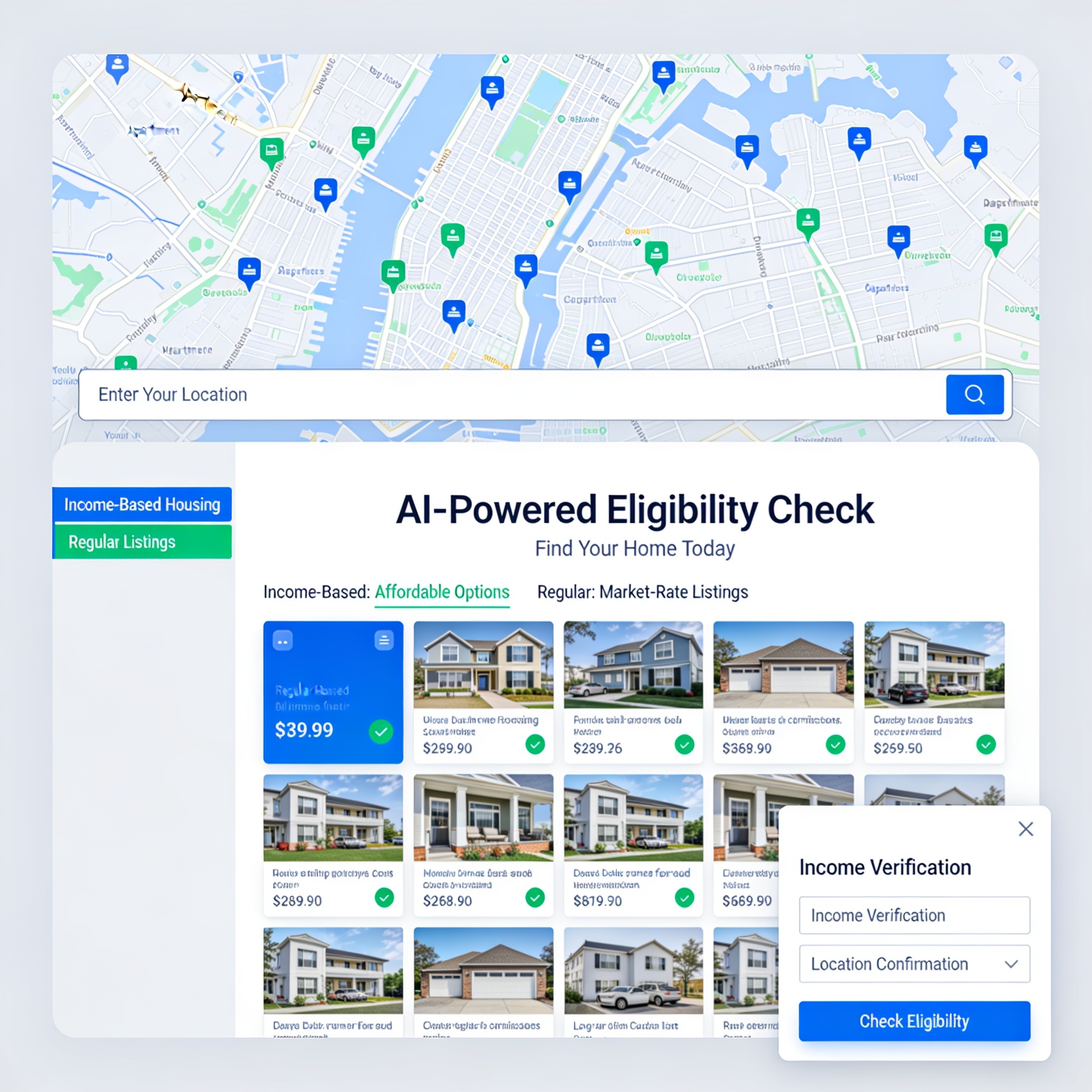
create a website for apartments that uses real APIs and data bases for listing and renting properties.
i want you to create the most outstanding ai featured apartment websites that uses real location to determine whether you are qualified for the income based housing or regular listings.

